
Anime Island Resort [v0.2] [Fabian258]
76 views
About this game
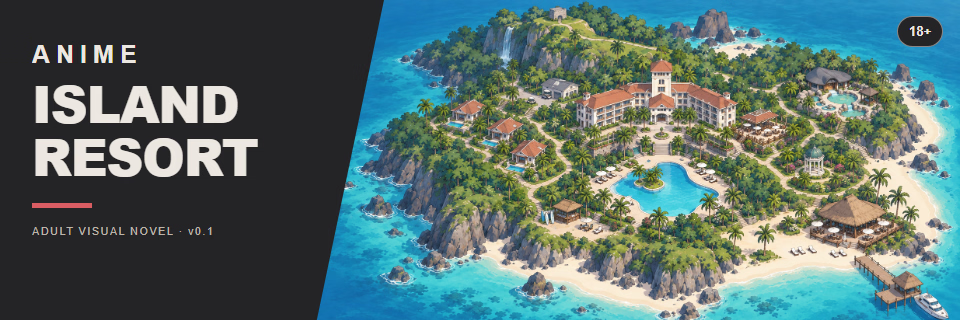
An adult anime-style visual novel set at a tropical resort. The player takes the role of the resort manager, meets three guests, and follows their stories through conversations and animated scenes. Gameplay involves visiting different locations as the day turns to night, with main story events and short, repeatable encounters.
Thread Updated: 2026-11-15
Release Date: 2026-11-15
Developer: Fabian258 Fabian258 – Patreon
Censored: Yes
Version: v0.2
Engine: Unity
Listed platforms: Windows
Language: English
Store: itch.io
Genre: 2DCG, Visual Novel, Animated, Voiced (AI-generated)
DOWNLOAD
Tags
Installation
1. Download the Windows ZIP and extract the entire archive. 2. Launch Anime Island Resort.exe from the extracted folder. 3. Keep the data folder and accompanying runtime files beside the executable.
Changelog
v0.2 Makima and Yoruichi get their first story chapters in this update: one for Makima and two for Yoruichi. Makima's chapter starts at the bar, while Yoruichi's story begins by the pool and continues in a second chapter. There are four new full-screen animation clips, including two versions of Makima's scene that you can switch between. The new chapters also include 28 voiced character lines. v0.1 - Initial release Current Content: 6 full-screen animated scenes, with an additional Slow/Fast video variant in Chapter 1. 91 English-voiced female dialogue lines. 3 guests and their arrival conversations. The first 3 main story chapters for one guest. 3 repeatable encounters across the resort. Animated character portraits, a day/night island map, and character profiles. Background music, ambient sound, local saves, and separate audio volume controls.
Developer Notes
Choose a location on the island map, then select an available event. During dialogue, click once to reveal the rest of the current line, then click again to continue. Chapter animations loop until you choose NEXT. Chapter 1 also includes a >> button to switch its video variant.
More Like This
Unity · Uncensored
To the New Continent [v0.44] [Stone Phoenix]
★ 2.0 · 584 views ·

Unity · Uncensored
Ero Fighters [Demo] [NahMan Studio]
★ 4.7 · 4 views ·
Unity · Uncensored
Set of Hands [v0.2.6] [V.Jagger]
★ 3.6 · 283 views ·
Unity · Uncensored
Janitor of Love [v0.16 Premium] [Umbra Erotica]
★ 2.4 · 619 views ·